


118Leds Solar Lights Outdoor Clip Motion Sensor Lights Security Light 3 Modes, 3 Color Temperature, Solar Powered, USB Charging (2 Pack)
800 Lumens - Bright Security Lighting for Your Peace of Mind clip on solar lights clip on motion sensor lights solar clip on lights outdoor clamp on solar lights 3 Adjustable Colors - Switch Between Cool White, Neutral, and Warm White solar motion lights outdoor solar sensor lights solar clip...
)
800 Lumens - Bright Security Lighting for Your Peace of Mind

clip on solar lights

clip on motion sensor lights

solar clip on lights outdoor

clamp on solar lights
3 Adjustable Colors - Switch Between Cool White, Neutral, and Warm White

solar motion lights outdoor

solar sensor lights

solar clip light

outdoor solar clip light
3 Installation Ways - Clip, Screw, or Hang Eeffortlessly Anywhere

For Performance:
- Height: Install 5-8 ft (1.5-2.5 m) high.
- Angle: Point the solar panel towards the sun. Location: Keep the motion sensor clear of obstructions.
- Avoid: Do not install under existing light sources (e.g., porch lights), as this can prevent automatic operation.
3 Working Modes - Select the correct mode to achieve the desired effect

- Step 1: Press the button to cycle Modes 1→2→3→OFF; Step 2: Hold the button for 5s to change colors (White→Neutral→Warm)
- Mode 1 : Dim light all night. Bright light for 15 sec on motion
- Mode 2 (Motion Only): Bright light for 15 sec on motion only
- Mode 3 (Always-On): Soft dim light stays on all night
How to Charge & Test Your Light
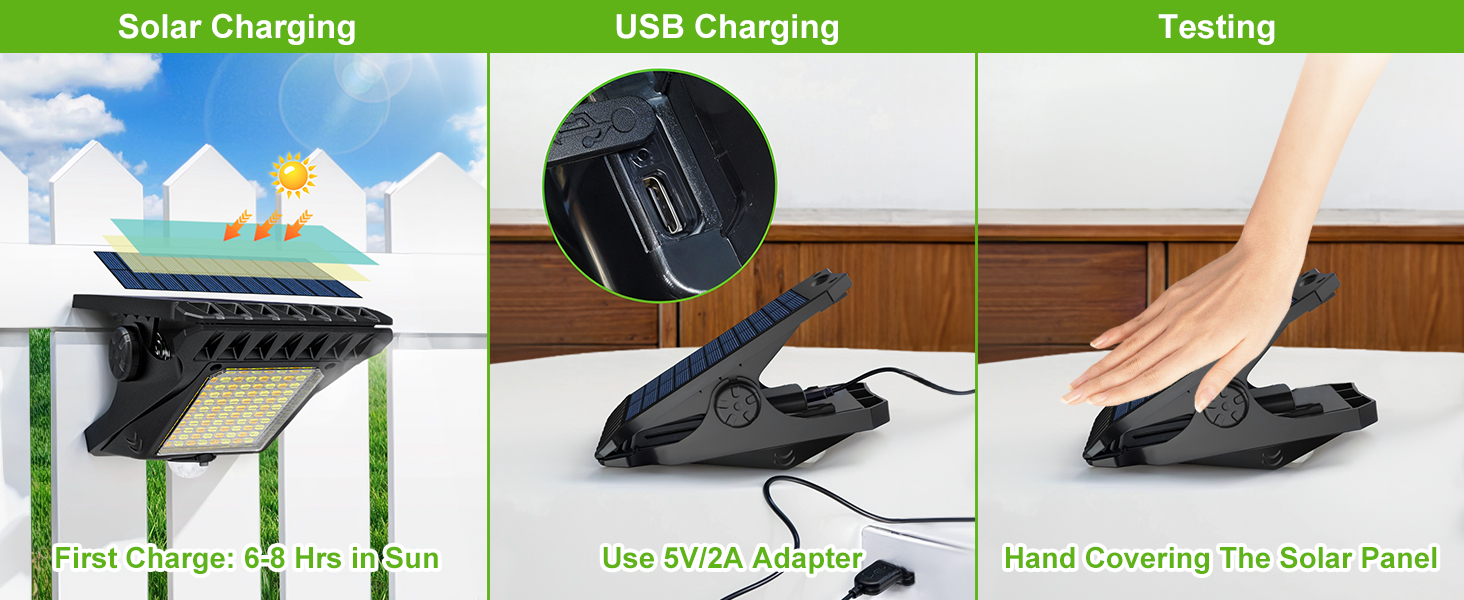
- First Use is Crucial:
- Fully charge before first use via sun (6-8h) or USB (4-5h).
- Peel off the protective film on the solar panel before first use.
- To test indoors or during the day: Cover the solar panel completely with your hand to simulate darkness. Wait 5 seconds, then test motion.
| Type: | |
|---|---|
| Vendor: |